
Most lists of smart gadgets for everyday life skip the part that decides whether a gadget actually helps: the spec sheet. A wireless charger that can’t reach your phone through its case, or a USB-C hub that won’t send video from your laptop, adds hassle instead of removing it.
This guide covers the everyday tech accessories that fix common daily annoyances, plus the specific details worth checking before you buy. The examples come from the Electronics category at Belfield Distributors, so the numbers you’ll see are real listing details, not guesses.
Match the Gadget to a Moment in Your Day
The most useful smart gadgets solve a problem you run into again and again. Here’s a quick way to sort the options:
- Phone always low by evening: wireless chargers and phone charging accessories
- Laptop with too few ports: a USB-C adapter
- Calls while driving, cooking, or walking: a Bluetooth headset
- Missed deliveries or visitors: a WiFi video doorbell camera
- Hot commutes, desks, or bedrooms: portable USB fans
If a gadget doesn’t connect to something you do every week, it probably won’t feel convenient for long.
Wireless Chargers: Check the Distance and Your Case
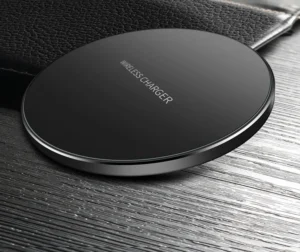
Wireless charging is handy because you set the phone down instead of fumbling with a cable. But it only works across a very small gap. Belfield’s fast wireless charging pad is designed for wireless charging-compatible phones. A slim case is fine. A rugged case, a wallet case, a phone grip, or a metal plate for a magnetic car mount can push the phone out of range or block charging completely.
A few other numbers on that listing tell you how it will behave:
- Output: The charging pad offers standard and fast charging modes. For everyday use, it is better suited to desk or overnight charging than to a quick boost before you leave.
- Temperature range: Follow the product’s operating instructions and avoid placing the charging pad in direct sunlight or near other heat sources.
- Conversion rate: Wireless charging can generate some heat during operation, so keep the pad and phone away from direct heat sources.
Your phone also needs wireless charging built in. When comparing pads in general, the Wireless Power Consortium explains that products carrying the Qi or Qi2 logo have passed independent lab testing for safety and interoperability.
Phone Charging Accessories That Tame Cord Clutter
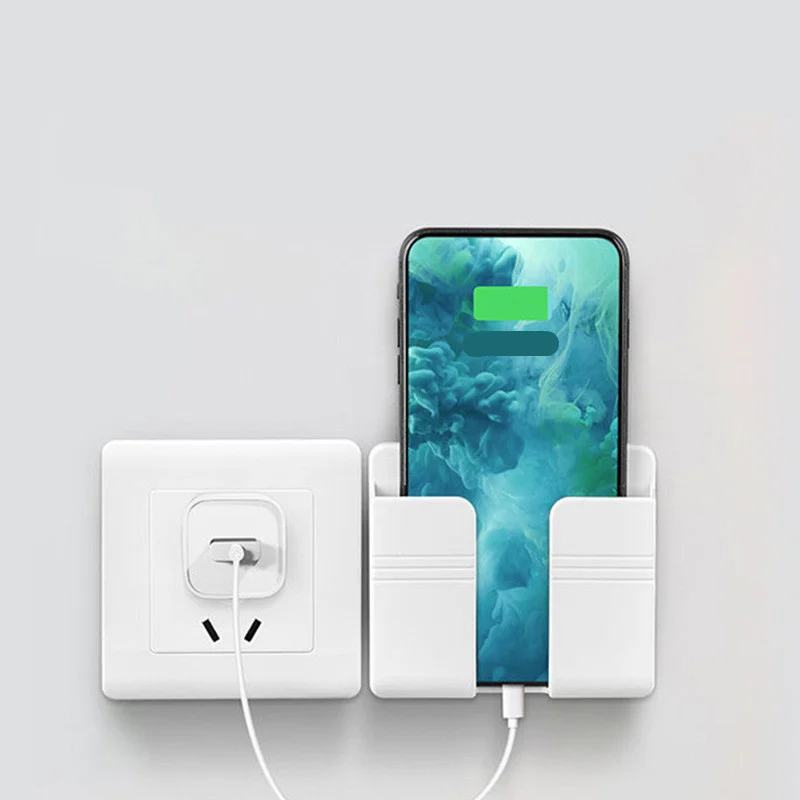
Not every convenience upgrade is high tech. The mobile phone charging storage rack is designed to hold a charging phone while keeping it off the counter or floor. Check the product dimensions against your phone and case before ordering to make sure it will fit.
Your case is part of your charging setup too. Belfield carries a clear shockproof TPU case for a range of older iPhone models and a leather and glass case for the Samsung S20. Check that your exact model appears in the options. The clear case is sold as compatible with iPhone, not made by Apple. And keep that 8 mm charging distance in mind when choosing between slim and bulky smartphone accessories.
USB C Adapters: Read the Port List Before You Buy
Many thin laptops have only one or two USB-C ports. A multiport adapter turns one of them into a small docking station. Belfield’s USB C computer converter is a useful example of a multiport adapter for expanding the connectivity of a compatible laptop.
- Two HDMI outputs up to 4K at 30Hz, plus VGA up to 1080p at 60Hz
- USB 3.0 ports rated up to 5Gbps
- SD and microSD card slots
- Wired Ethernet rated at 10/100 Mbps
- A 3.5 mm audio jack
- A USB-C charging port that uses USB Power Delivery
Those details matter. 4K at 30Hz works well for documents, spreadsheets, and video, but scrolling and mouse movement look less smooth than at 60Hz. The Ethernet port tops out at 100Mbps, so if your home internet plan is faster than that, WiFi may actually beat the cable.
Working from a laptop all day? Two simpler, practical electronic gadgets pair well with an adapter: a notebook stand that raises the screen, and a wired USB mouse that never needs charging or pairing.
Bluetooth Headsets With a Backup Battery Built In
A Bluetooth headset keeps your hands free for calls on the go. Belfield’s multifunction Bluetooth headset also has a charging case designed to provide additional power when needed. Check the current product listing for the available specifications before ordering.
Set realistic expectations for that backup power. 2000 mAh is smaller than the battery in most current smartphones, and some energy is lost in the transfer. Treat it as an emergency boost to get you home, not a full recharge. Real range also shrinks when walls or your own body sit between the headset and your phone.
WiFi Video Doorbell Cameras: Easy Setup, Real Responsibilities
Of all the connected devices for everyday use, a video doorbell probably changes a daily routine the most. You can see who’s at the door and talk to them from your phone. Belfield’s WiFi video doorbell camera is designed for home entry monitoring and includes connected features for viewing and communicating with visitors. Check the current product listing for available power, storage, battery, and connectivity specifications before ordering.
Before you mount it, think through three things:
- Signal at the door: Stand on your front step and check your phone’s WiFi. A weak signal means laggy video and missed alerts.
- Battery routine: A battery doorbell needs regular recharging. A spare battery lets you swap instead of leaving the door uncovered.
- Local storage: Clips saved to a card stay on the device. If someone removes the doorbell, the card leaves with it.
Security deserves a few minutes too. The FTC’s advice on securing home security cameras starts with replacing the default username and password with a unique one. It also recommends keeping the camera software and app updated, turning on two-factor authentication when it’s offered, and making sure your home WiFi uses WPA2 or WPA3 encryption. The FTC also suggests keeping cameras on a separate network from your computers.
Portable USB Fans: Personal Cooling With a Clear Limit

Portable USB fans are inexpensive gadgets that make life easier on commutes, at outdoor events, and at stuffy desks. Belfield’s Electrical collection has four different styles, each suited to a different situation:
- A bladeless neck fan for walking, running, or travel when you want your hands free
- A desktop fan with 100 speed settings and a digital display
- A 3-in-1 rechargeable fan that folds, mounts on a wall, and doubles as a warm night light, sold in 1200 mAh and 5000 mAh versions
- A handheld turbo fan that also works as a dust blower for computers and car interiors
Know the limit, though. The CDC’s heat and health guidance says to use fans only when indoor temperatures are below 90°F, because above that a fan can increase body temperature. A personal fan is a comfort tool, not a replacement for air conditioning during a heat wave.
Charging Habits That Keep Rechargeable Gadgets Safe
The headset, fans, and doorbell all run on rechargeable lithium-ion batteries. New York State’s lithium-ion battery safety guide recommends using the charger approved by the device maker. It also advises against charging small devices on a bed, pillow, or couch, and says to unplug once the battery is full. Stop using any device that gets extremely hot, swells or leaks, makes hissing or popping sounds, or gives off an unusual smell.
Frequently Asked Questions
How do I know if my phone supports wireless charging?
Check your phone’s spec page or manual for Qi wireless charging. iPhone models from the iPhone 8 onward support it, as do many Samsung Galaxy phones, including the S20. Older or budget phones often don’t.
Why does my phone get warm on a wireless pad?
Wireless charging is less efficient than a cable, and the lost energy becomes heat. Poor alignment makes it worse. If the phone feels hot rather than warm, take off the case, center the phone on the pad, and move the setup away from direct sunlight.
How can I tell if my laptop’s USB-C port supports video?
Look for a small D-shaped DisplayPort symbol or a lightning bolt Thunderbolt symbol next to the port. You can also search your laptop’s spec sheet for “DisplayPort Alt Mode.” Without that support, the HDMI and VGA ports on an adapter won’t show anything.
Can I run two monitors from one USB-C adapter?
It depends on your laptop, not just the adapter. Some laptops can drive only one external display, and some will mirror the same image on both screens instead of extending your desktop. Check your laptop’s external display support before planning a dual monitor setup.
Can the USB ports on an adapter charge my tablet?
Not quickly. The twelve-in-one converter rates its USB 3.0 ports at 5V and 900 mA, about 4.5 W. That’s plenty for a mouse, keyboard, or flash drive, but slow for a tablet. Plug your laptop charger into the Power Delivery port to keep the laptop powered while you use the other ports.
Can a Bluetooth headset connect to my phone and laptop at the same time?
Only if it supports multipoint connection, which Belfield’s multifunction headset lists. Multipoint lets you stay paired with two devices, so a phone call can come through while you’re connected to your laptop.
What does mAh mean on fans and power banks?
Milliamp hours measure how much charge a battery holds. Higher numbers generally mean longer runtime, so the 5000 mAh version of the 3-in-1 fan should run longer than the 1200 mAh version at the same speed. Higher speeds and extra features like a night light drain the battery faster.
What if an accessory doesn’t fit my device?
Belfield offers a 30-day return period from the date of delivery, provided it is unused and in its original packaging. That makes it worth checking model names, measurements, and port details against your device before you order.